
 Subscribe
 Follow Us
jQuery beautiful Animated Progress bar Plugin
 12 years ago
 11500
11500 2588
2588
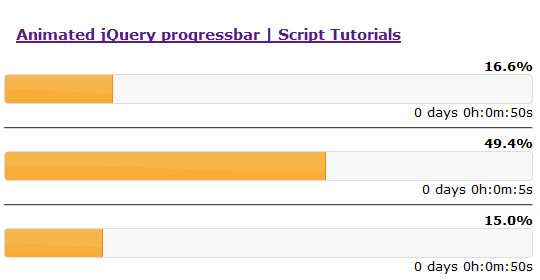
The dynamic animated progressbar. I think you already know this jQuery widget – Progressbar. By default – this is static widget without any animation. Today we will expand possibilities of that plugin – we will make it – dynamic. And also will issue our result as a new jQuery plugin.
Step 1. HTML
Here are all html of my demo
index.html
<!DOCTYPE html>
<html lang="en">
<head>
<link href="css/jquery-ui-1.8.16.custom.css" rel="stylesheet" type="text/css"/>
<link href="css/main.css" rel="stylesheet" type="text/css" />

<script type="text/javascript" src="js/jquery-1.6.2.min.js"></script>
<script type="text/javascript" src="js/jquery-ui-1.8.16.custom.min.js"></script>
<script type="text/javascript" src="js/script.js"></script>

<title>Animated jQuery progressbar | Script tutorials</title>
</head>
<body>
    <div class="example">
        <h3><a href="#">Animated jQuery progressbar | Script Tutorials</a></h3>

        <div id="progress1">
            <div class="percent"></div>
            <div class="pbar"></div>
            <div class="elapsed"></div>
        </div>

        <hr />
        <div id="progress2">
            <div class="percent"></div>
            <div class="pbar"></div>
            <div class="elapsed"></div>
        </div>

        <hr />
        <div id="progress3">
            <div class="percent"></div>
            <div class="pbar"></div>
            <div class="elapsed"></div>
        </div>
    </div>
</body>
</html>
As you can see – I prepared 3 progressbars. Each progressbar will have own behaviour (using own properties).
Also, make attention to linked jQuery libraries and styles. How I prepared this? Very easy, goto here, select UI Core and single widget – Progressbar, then – just Download result. You will get package with all necessary libraries (jquery-1.6.2.min.js + jquery-ui-1.8.16.custom.min.js + jquery-ui-1.8.16.custom.css + related images).
Step 2. CSS
Here are our CSS styles.
css/main.css
body{background:#eee;font-family:Verdana, Helvetica, Arial, sans-serif;margin:0;padding:0}
.example{background:#FFF;width:650px;font-size:80%;border:1px #000 solid;margin:20px auto;padding:15px;position:relative;-moz-border-radius: 3px;-webkit-border-radius: 3px}
h3 {text-align:center}

.pbar .ui-progressbar-value {display:block !important}
.pbar {overflow: hidden}
.percent {position:relative;text-align: right;}
.elapsed {position:relative;text-align: right;}
Step 3. JS
In this JS we will write expanded plugin for jQuery with our new progressbar.
js/script.js
$(document).ready(function(){
    jQuery.fn.anim_progressbar = function (aOptions) {
        // def values
        var iCms = 1000;
        var iMms = 60 * iCms;
        var iHms = 3600 * iCms;
        var iDms = 24 * 3600 * iCms;

        // def options
        var aDefOpts = {
            start: new Date(), // now
            finish: new Date().setTime(new Date().getTime() + 60 * iCms), // now + 60 sec
            interval: 100
        }
        var aOpts = jQuery.extend(aDefOpts, aOptions);
        var vPb = this;

        // each progress bar
        return this.each(
            function() {
                var iDuration = aOpts.finish - aOpts.start;

                // calling original progressbar
                $(vPb).children('.pbar').progressbar();

                // looping process
                var vInterval = setInterval(
                    function(){
                        var iLeftMs = aOpts.finish - new Date(); // left time in MS
                        var iElapsedMs = new Date() - aOpts.start, // elapsed time in MS
                            iDays = parseInt(iLeftMs / iDms), // elapsed days
                            iHours = parseInt((iLeftMs - (iDays * iDms)) / iHms), // elapsed hours
                            iMin = parseInt((iLeftMs - (iDays * iDms) - (iHours * iHms)) / iMms), // elapsed minutes
                            iSec = parseInt((iLeftMs - (iDays * iDms) - (iMin * iMms) - (iHours * iHms)) / iCms), // elapsed seconds
                            iPerc = (iElapsedMs > 0) ? iElapsedMs / iDuration * 100 : 0; // percentages

                        // display current positions and progress
                        $(vPb).children('.percent').html('<b>'+iPerc.toFixed(1)+'%</b>');
                        $(vPb).children('.elapsed').html(iDays+' days '+iHours+'h:'+iMin+'m:'+iSec+'s</b>');
                        $(vPb).children('.pbar').children('.ui-progressbar-value').css('width', iPerc+'%');

                        // in case of Finish
                        if (iPerc >= 100) {
                            clearInterval(vInterval);
                            $(vPb).children('.percent').html('<b>100%</b>');
                            $(vPb).children('.elapsed').html('Finished');
                        }
                    } ,aOpts.interval
                );
            }
        );
    }

    // default mode
    $('#progress1').anim_progressbar();

    // from second #5 till 15
    var iNow = new Date().setTime(new Date().getTime() + 5 * 1000); // now plus 5 secs
    var iEnd = new Date().setTime(new Date().getTime() + 15 * 1000); // now plus 15 secs
    $('#progress2').anim_progressbar({start: iNow, finish: iEnd, interval: 100});

    // we will just set interval of updating to 1 sec
    $('#progress3').anim_progressbar({interval: 1000});
});
In first half you can see our new jQuery plugin – anim_progressbar, in second – several examples of initializations with different params.
The article source:http://www.script-tutorials.com/animated-jquery-progressbar/
You might also like


Tags
accordion accordion menu animation navigation animation navigation menu carousel checkbox inputs css3 css3 menu css3 navigation date picker dialog drag drop drop down menu drop down navigation menu elastic navigation form form validation gallery glide navigation horizontal navigation menu hover effect image gallery image hover image lightbox image scroller image slideshow multi-level navigation menus rating select dependent select list slide image slider menu stylish form table tabs text effect text scroller tooltips tree menu vertical navigation menu